Welcome to the TEAMS Agent Portal
The TEAMS Agent Portal is a secure, centralised workspace designed to support your day-to-day activities as an education agent. It provides real-time access to your student applications, enrolments, commissions, communications, and shared resources from the organisation.
Upon logging in, you will be presented with a dashboard that summarises your key activities and highlights any actions requiring your attention.
Dashboard Overview
The dashboard serves as your primary workspace and provides a high-level snapshot of your performance and activity.
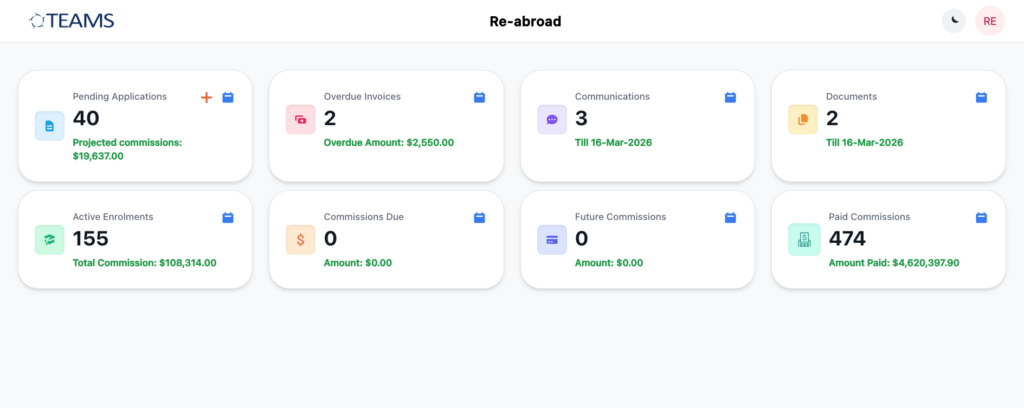
You will see key metrics displayed as tiles, including:
- Pending Applications
- Overdue Invoices
- Active Enrolments
- Commission Summary
Each tile offers a quick overview and can be selected to access detailed records. This layout is designed to help you efficiently monitor progress, prioritise tasks, and stay informed.
Key Portal Sections
Pending Applications
You can:
- Review student details, selected programmes, and campus information
- Monitor application status and progress
- View projected commission associated with each application
Regular monitoring of this section ensures timely follow-up and improved conversion outcomes.
Communications & Documents Section
Communications
The Communications section provides visibility of all relevant interactions shared with you by the organisation.
This includes:
- Contact logs
- Emails
- SMS communications
Each record can be opened to review full details, ensuring you remain informed of all updates relating to your students and activities. Only communications relevant to your role will be visible.
Documents
This section provides access to important resources shared with you.
Available documents may include:
- Marketing materials
- Programme brochures
- Student handbooks
- Operational resources
You can search, filter, and download documents as required. Shared resources may be specific to your agency or made available to multiple agents.
Active Enrolments
The Active Enrolments section lists all students currently enrolled through your agency. You can:
- View student and programme details
- Track enrolment periods
- Access associated commission information
This section helps you monitor your active student base and maintain ongoing engagement.
Commissions
The Commissions section provides a structured overview of your earnings. Commissions are categorised as follows:
This allows you to track earnings, review payment history, and forecast future income.
Commission Due
Payments pending receipt
Future Commission
Upcoming payments based on scheduled milestones
Paid Commission
Completed payments
How-To Guides
How to View Applications
- Log in to the Agent Portal
- Select Pending Applications from the dashboard
- Review the application list
- Select a record to view detailed information
How to Check Your Commission
1. Select Commissions from the dashboard
2. Choose a category:
- Commission Due
- Future Commission
- Paid Commission
3. Review the relevant details
How to Download Documents
- Select Documents from the dashboard
- Search or browse for the required file
- Select the document
- Click Download
How to Filter Information
- Open any section from the dashboard
- Select the calendar or filter option
- Choose your preferred date range
- View updated results
The TEAMS Agent Portal is designed to provide clear visibility, streamline communication, and support effective management of your students and commissions. By regularly reviewing your dashboard and key sections, you can stay organised, responsive, and informed at all times.