
TEAMS Agent Mobile App
Manage Your Student Activity Anytime, Anywhere
The TEAMS Agent Mobile App is designed to support education agents in managing day-to-day activities efficiently while on the move.
With real-time access to applications, enrolments, commissions, and key documents, the app ensures you remain informed, responsive, and in control—without needing to rely on multiple systems.
The interface is structured into clear, user-friendly sections, allowing you to quickly access the information you need and take action where required.
Pending Applications
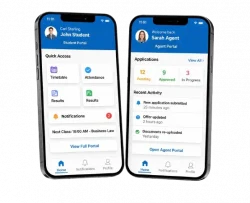
The Pending Applications section provides a consolidated view of all student applications currently in progress.
This allows you to:
- Monitor application status in real time
- Identify applications requiring follow-up
- Stay proactive in progressing submissions
Each application includes key details such as student name and current status. Selecting an application will display further information to support your review and next steps.
Active Enrolments
The Active Enrolments section displays all students who are currently enrolled and studying.
This feature enables you to:
- Track active student placements
- Review enrolment details and program information
- Stay informed about student progress and status
By selecting a student record, you can access detailed enrolment information without the need for additional follow-up.
Commissions
The Commissions section provides a structured overview of your earnings. Commissions are categorised as follows:
Commissions are organised into three categories:
You can access detailed records within each category to track your income accurately and maintain financial visibility.
Commission Due
Payments ready to be processed
Future Commission
Expected commissions for upcoming periods
Paid Commission
Completed payments
Communications & Documents Section
Communications
The Communication section keeps you informed of updates, messages, and interactions related to your students and applications.
This helps you:
- Stay aligned with ongoing processes
- Track important updates
- Respond or follow up in a timely manner
Documents
The Documents section gives you direct access to important materials provided by the college, including:
- Marketing brochures
- Application forms
- Supporting documentation
All documents are available within the app, allowing you to view or download files as needed. This ensures you always have access to the most up-to-date resources when working with prospective or current students.
Overdue Invoices
The Overdue Invoices section highlights any outstanding payments associated with your students.
Through this section, you can:
- Review pending invoices
- Monitor payment status
- Manage financial follow-ups more effectively
How to Use Key Features
How to View Application Details
Open the app and navigate to Pending Applications
Select the relevant application
Review student details and current application status
How to Check Your Commissions
- Open the Commission section
- Select a category: Due, Future, or Paid
- Choose a record to view detailed information
How to View Student Enrolment Details
- Navigate to Active Enrolments
- Select the student from the list
- Review program details and enrolment status
How to Access Documents
- Open the Documents section
- Select the required document
- View within the app or download for later use
How to Filter Records by Date
- Open any relevant section (e.g. Applications or Commission)
- Tap the calendar icon
- Select your preferred date range
- Apply the filter to update results
The TEAMS Agent Mobile App is built to streamline your workflow, improve visibility across your student pipeline, and support faster, more informed decision-making.
By consolidating key functions into a single, mobile-friendly solution, the app helps you remain efficient, organised, and responsive—wherever you are.